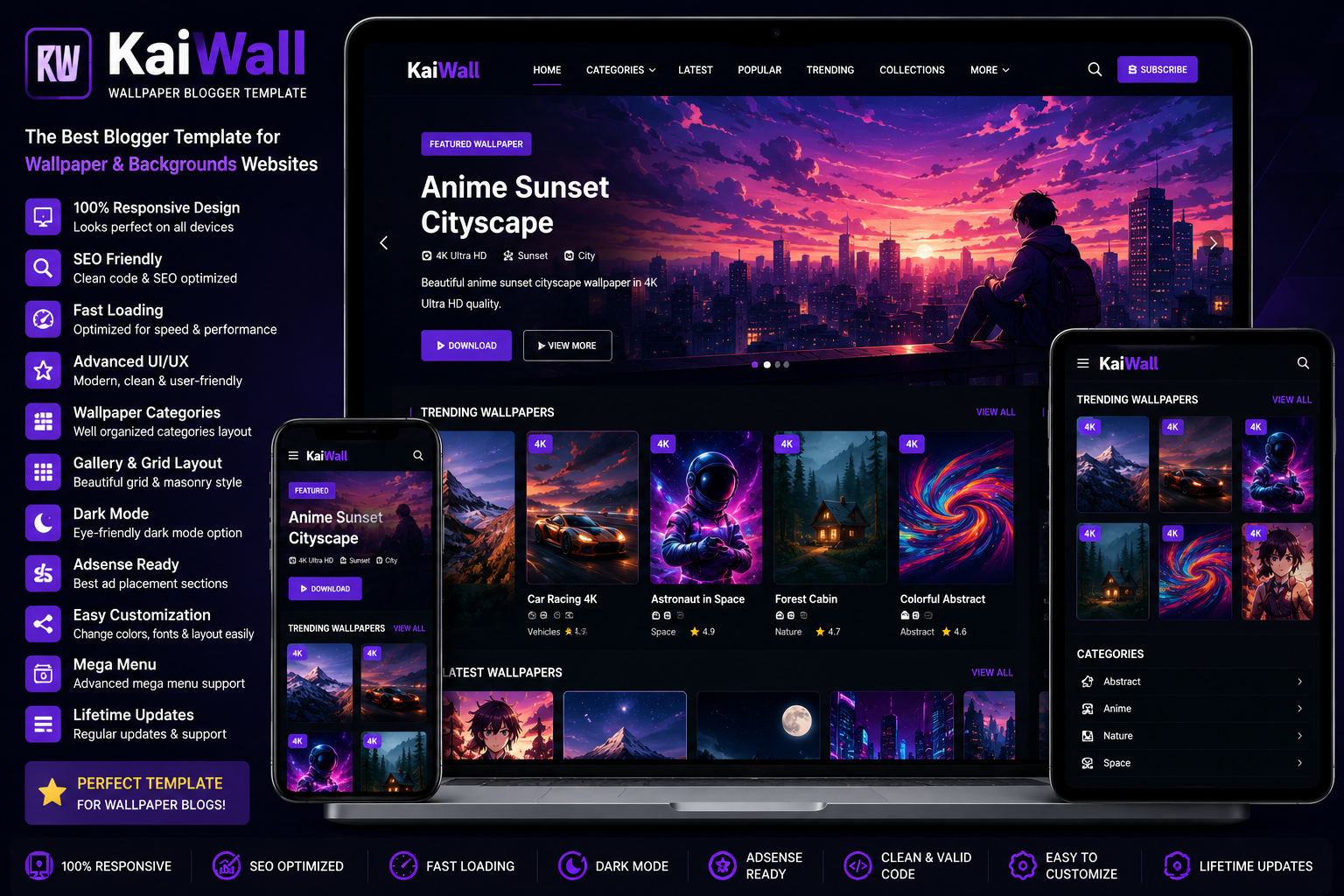
The KaiWall Wallpaper Blogger Template is optimized for speed, user experience, and search engine visibility. Whether you publish 4K wallpapers, anime backgrounds, gaming wallpapers, nature photography, or mobile wallpapers, this template offers an attractive homepage and an organized layout that works perfectly on desktops, tablets, and smartphones.
If you’re searching for more Blogger themes, don’t forget to explore our Responsive Blogger Templates, Portfolio Blogger Templates, Magazine Blogger Templates, and Best Blogger Templates 2026 collections on QuickStackTools to discover additional premium designs.
Why Choose the KaiWall Wallpaper Blogger Template?
A wallpaper website requires more than beautiful images. Visitors expect fast loading pages, easy navigation, mobile compatibility, and organized categories. The KaiWall Wallpaper Blogger Template combines all these features in one modern Blogger theme.
Its lightweight coding improves website performance, while its SEO-friendly structure helps search engines crawl and index your pages efficiently. The clean design also keeps visitors engaged for longer, increasing page views and improving the overall user experience.
Key Features
Modern Wallpaper Design
The template features a stylish homepage with large wallpaper previews, featured collections, trending wallpapers, and category sections that make browsing simple and enjoyable.
Fully Responsive Layout
The layout automatically adjusts to desktops, laptops, tablets, and smartphones, ensuring your wallpapers look great on every screen size.
SEO-Friendly Structure
Built with clean HTML and optimized code, the template supports better indexing and improves your chances of ranking in search engine results.
Fast Loading Performance
The lightweight framework helps reduce page loading time, improving Core Web Vitals and creating a smoother browsing experience for visitors.
Wallpaper Gallery
Display wallpapers in organized sections, including:
- Featured Wallpapers
- Latest Uploads
- Popular Downloads
- 4K Wallpapers
- Mobile Wallpapers
- Anime Wallpapers
- Nature Backgrounds
- Gaming Wallpapers
- Trending Categories
This organized layout helps users quickly find their favorite wallpapers.
Easy Customization
You can easily customize:
- Website Logo
- Navigation Menu
- Homepage Banner
- Colors
- Fonts
- Sidebar Widgets
- Footer
- Social Media Icons
- Advertisement Areas
No advanced coding knowledge is required.
Who Should Use This Template?
The KaiWall Wallpaper Blogger Template is perfect for:
- Wallpaper Download Websites
- 4K Wallpaper Blogs
- Anime Wallpaper Sites
- Mobile Wallpaper Blogs
- Gaming Wallpaper Collections
- Nature Photography Websites
- Desktop Background Blogs
- Digital Art Galleries
- Photography Portfolios
- Personal Wallpaper Collections
Its flexible design makes it suitable for almost any wallpaper-related niche.
How to Install KaiWall Wallpaper Blogger Template
Installing the template is simple and beginner-friendly.
First, download the latest version of the template from ProTemplates.in. After downloading the ZIP file, extract it and locate the XML template file.
Next, open your Blogger Dashboard, go to Theme, click the drop-down menu, select Restore, and upload the XML file.
Within a few moments, your new Blogger theme will be installed successfully.
If you need additional guidance, you can read our How to Install Blogger Templates tutorial on QuickStackTools, where we explain the complete setup process step by step.
Customize Your Wallpaper Website
Once the template is installed, personalize your website to match your brand.
Update your:
- Website Logo
- Homepage Banner
- Featured Wallpaper Slider
- Navigation Menu
- Categories
- Sidebar Widgets
- Footer
- Contact Information
- Social Media Links
- Brand Colors
A customized design creates a stronger identity and encourages visitors to explore more wallpapers.
SEO Tips for Better Rankings
Installing a premium Blogger theme is only the first step toward building a successful wallpaper website. Publish original wallpapers, optimize every image with descriptive file names and ALT text, create SEO-friendly URLs, and connect related posts using internal links.
For example, visitors interested in wallpaper themes may also enjoy our Responsive Blogger Templates, Magazine Blogger Templates, Portfolio Blogger Templates, and Bio Landing Page Blogger Template guides. Internal linking improves navigation while helping search engines understand your website structure.
You should also test your website using Google PageSpeed Insights to improve performance and submit your sitemap through Google Search Console for faster indexing. If you’re new to Blogger, the Blogger Help Center provides useful documentation about customization and settings.
Download KaiWall Wallpaper Blogger Template
If you’d like to download the original KaiWall Wallpaper Blogger Template, visit ProTemplates.in for the latest version and updates.
After downloading the template, return to QuickStackTools for installation tutorials, Blogger SEO guides, customization tips, and additional free Blogger template collections that can help you build a professional wallpaper website.
Final Thoughts
The KaiWall Wallpaper Blogger Template is an excellent choice for anyone who wants to create a modern wallpaper website using Blogger. Its responsive design, SEO-friendly coding, fast-loading performance, organized wallpaper gallery, and easy customization options make it suitable for beginners and experienced bloggers alike.
Whether you share anime wallpapers, gaming backgrounds, 4K desktop wallpapers, or mobile backgrounds, this template provides everything you need to build a professional, user-friendly, and search-engine-optimized website. With regular content updates and proper SEO practices, you can grow your traffic and create a successful wallpaper blog in 2026.