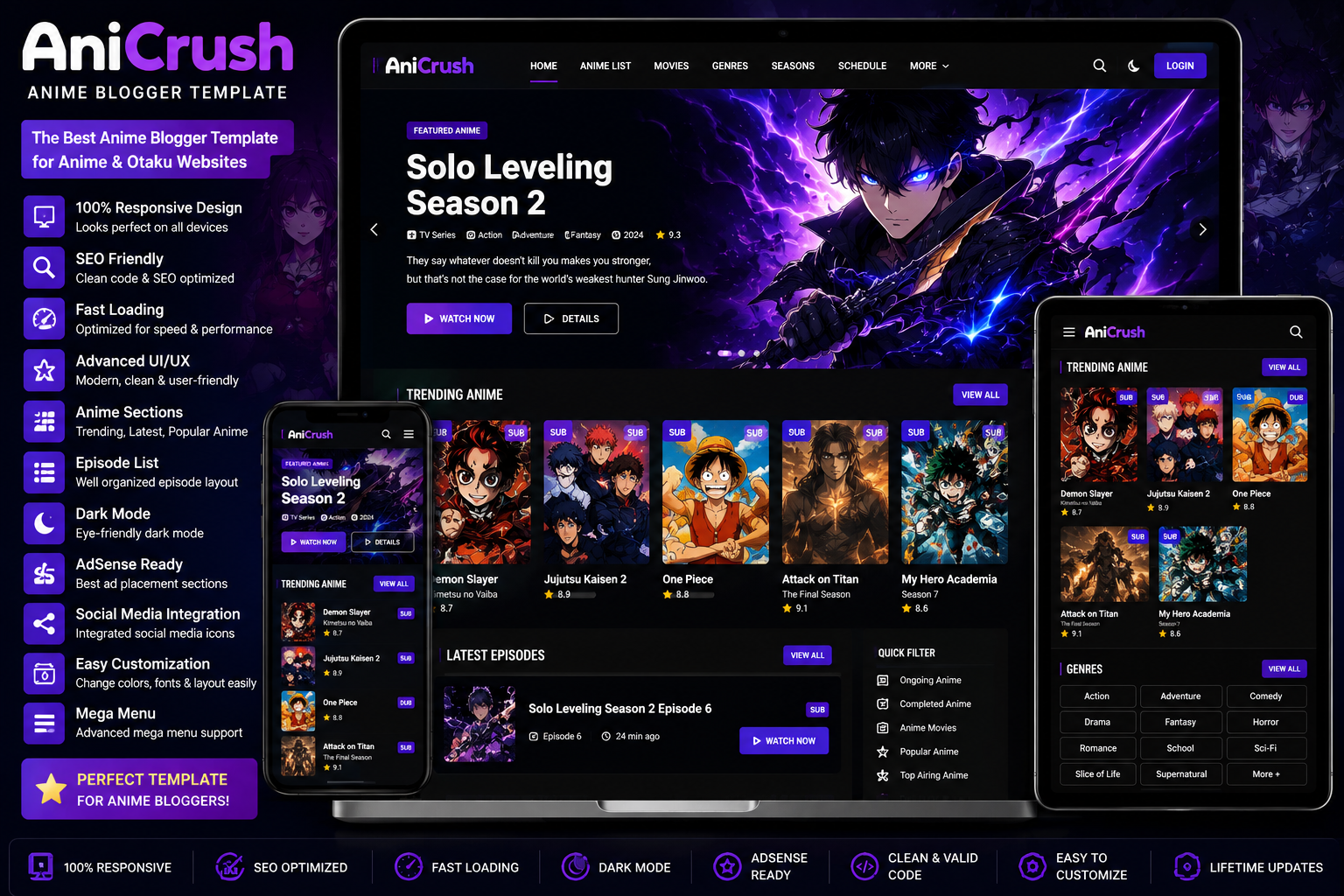
The AniCrush Anime Blogger Template is designed for anime fans, bloggers, and content creators who want to publish anime news, episode updates, manga reviews, character guides, and entertainment articles. Its premium homepage layout and mobile-friendly interface ensure visitors enjoy a smooth browsing experience on desktops, tablets, and smartphones.
If you’re looking for more professional Blogger themes, explore our Responsive Blogger Templates, Magazine Blogger Templates, Portfolio Blogger Templates, and Best Blogger Templates 2026 collections on QuickStackTools to discover more high-quality designs..
Why Choose the AniCrush Anime Blogger Template?
A successful anime website needs more than attractive graphics. It should load quickly, provide easy navigation, and be optimized for search engines. The AniCrush Anime Blogger Template delivers all these features while maintaining a modern appearance inspired by popular anime streaming platforms.
Its responsive structure ensures that every page looks great on any device, while the SEO-friendly coding helps improve search engine visibility.
Key Features
Modern Anime Design
The template features a premium dark interface with colorful highlights that perfectly match anime, manga, gaming, and entertainment websites.
Responsive Layout
Whether visitors browse your website from a desktop, laptop, tablet, or smartphone, the template automatically adjusts to provide a consistent user experience.
SEO-Friendly Structure
Clean HTML coding, optimized schema, and lightweight design make it easier for search engines to crawl and index your website.
Fast Loading Performance
Website speed is an important ranking factor. The AniCrush Anime Blogger Template is optimized for fast loading, helping improve Core Web Vitals and reducing bounce rates.
Premium Homepage
The homepage includes dedicated sections for:
- Featured Anime
- Latest Episodes
- Popular Series
- Trending Anime
- Genres
- Sidebar Widgets
- Advertisement Areas
- Social Media Links
These sections help organize content and improve user engagement.
Easy Customization
Without editing complicated code, you can customize:
- Website Logo
- Navigation Menu
- Homepage Banner
- Colors
- Fonts
- Sidebar
- Footer
- Social Media Icons
- Advertisement Sections
This allows you to create a unique anime website that matches your branding.
Who Should Use This Template?
The AniCrush Anime Blogger Template is ideal for:
- Anime Blogs
- Manga Websites
- Otaku Communities
- Anime Review Blogs
- Episode Guide Websites
- Webtoon Blogs
- Gaming Websites
- Entertainment Portals
- Movie Review Blogs
- Fan Communities
Whether you’re launching a new anime blog or redesigning an existing website, this template offers a professional solution.
How to Install the AniCrush Anime Blogger Template
Installing the template is quick and beginner-friendly.
First, download the original template package from ProTemplates.in. After downloading the ZIP file, extract it and locate the XML theme file.
Open your Blogger Dashboard, navigate to Theme, click the drop-down menu, choose Restore, and upload the XML file.
Within a few moments, your new Blogger theme will be installed successfully.
If you need additional help, check out our How to Install Blogger Templates guide on QuickStackTools for detailed instructions and screenshots.
Customize Your Website
After installation, personalize your anime website by updating:
- Website Logo
- Homepage Banner
- Featured Anime Slider
- Navigation Menu
- Genre Categories
- Sidebar Widgets
- Footer
- Contact Information
- Social Media Links
- Brand Colors
Customizing these sections creates a unique identity and improves the overall visitor experience.
SEO Tips for Better Rankings
A premium Blogger template is only one part of building a successful website. To rank higher in Google Search, publish original anime reviews, episode summaries, and entertainment news. Optimize every image with descriptive ALT text, create SEO-friendly URLs, and connect related posts using internal links.
For example, if readers are interested in anime themes, you can guide them to your Responsive Blogger Templates, Magazine Blogger Templates, or Portfolio Blogger Templates articles. Internal linking improves website navigation and helps search engines understand your site structure.
After publishing your website, analyze its performance using Google PageSpeed Insights and submit your sitemap through Google Search Console for faster indexing. You can also visit the official Blogger Help Center to learn more about Blogger features and customization options.